
Grip – Expense and budget tracker4.23.0 - Google Play
You'll be able to see results in few seconds.
Publisher Description

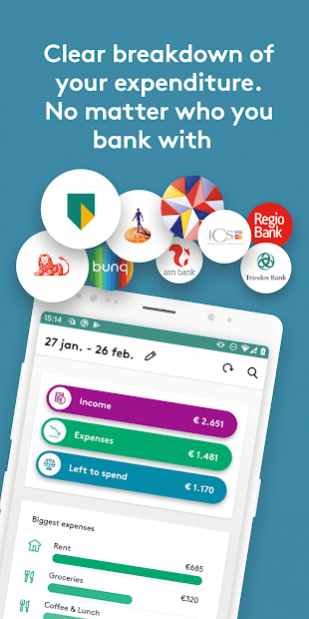


The Grip app gives you a complete overview of your income and expenditure, so you can see exactly what you are spending your money on. This will show you where you might be able to cut down on your spending, which we also want to help you with. We give useful savings-related and other tips and show you how to handle your money differently. This will leave you with more money for the things that matter most to you.
The benefits of the Grip app:
• Grip automatically assigns all your transactions to categories, so you can see exactly what you are spending every month on things like shopping or socialising.
• One app for all your bank accounts. You can now add all your ABN AMRO, ING, Rabobank, SNS Bank, bunq and ICS credit card accounts. More banks will follow.
• If there are certain things you want to spend less money on, like clothes for instance, you can set a budget. Grip will then show you how much you can still spend.
• If you’ve almost gone over your budget, Grip can alert you, if you want. Simply enable push notifications in the app (once only) and Grip will keep you up to date.
• If you want to find out how much you spent on a holiday, you can tag all your transactions for that holiday, from plane tickets to sunscreen to renting skis.
Who Grip is for?
You can use the Grip app if you are aged 18 or older and have an ABN AMRO, ING, Rabobank, SNS Bank or bunq Premium checking account.
Getting started with the Grip app:
Creating an account couldn’t be easier.
1. Enter your mobile number. You will be sent a text message with an activation code.
2. Enter the activation code to activate Grip on your mobile.
3. Choose a 6-digit log-in code and confirm it.
4. Link your bank account from ABN AMRO, ING, the Rabobank, SNS Bank or bunq Premium to Grip.
You can now log in to Grip using this 6-digit log-in code. You can also choose to log in using your fingerprint — quick, easy and secure.
Want more information?
Read more about Grip at abnamro.nl/gripapp and on abnamro.nl/en/personal/internet-and-mobile/apps/grip/frequently-asked-questions/index.html, there you can also find the terms and conditions and the privacy statement. You can also go to abnamro.nl/griptips and find out what Grip can do for you.
About Grip – Expense and budget tracker
The company that develops Grip – Expense and budget tracker is ABN AMRO Bank N.V.. The latest version released by its developer is 4.23.0.
To install Grip – Expense and budget tracker on your Android device, just click the green Continue To App button above to start the installation process. The app is listed on our website since 2021-09-20 and was downloaded 0 times. We have already checked if the download link is safe, however for your own protection we recommend that you scan the downloaded app with your antivirus. Your antivirus may detect the Grip – Expense and budget tracker as malware as malware if the download link to com.abnamro.grip is broken.
How to install Grip – Expense and budget tracker on your Android device:
- Click on the Continue To App button on our website. This will redirect you to Google Play.
- Once the Grip – Expense and budget tracker is shown in the Google Play listing of your Android device, you can start its download and installation. Tap on the Install button located below the search bar and to the right of the app icon.
- A pop-up window with the permissions required by Grip – Expense and budget tracker will be shown. Click on Accept to continue the process.
- Grip – Expense and budget tracker will be downloaded onto your device, displaying a progress. Once the download completes, the installation will start and you'll get a notification after the installation is finished.
Program Details
System requirements
Download information
Pricing
Version History
version 4.23.0 Comet
posted on 2021-09-20
New in Grip: the grocery tool! It helps you compare your expenses with those of a similar household in the Netherlands.
version 4.22.0 Comet
posted on 2021-07-28
You will now find the subscription helper amongst your insights! Helpers help you to gain even better insight into your financial situation, giving you even more control. We’re working on more helpers, so stay tuned! Feedback is always welcome.
version 4.21.0 Comet
posted on 2021-07-22
From now on, you can access the subscription page from the overview screen. In addition, we’ve removed some nasty bugs.
version 4.20.0 Comet
posted on 2021-07-08
From now on you see your linked current accounts in the overview screen. Very handy!
version 4.19.0 Comet
posted on 2021-06-08
What’s that? Dead bugs? That’s right, our bug busters went hunting and caught them! That means a more reliable Grip app for you!
version 4.17.0 Comet
posted on 2021-05-10
Do you want to filter your transactions based on an amount, a period, an account, a category or a combination of these? All of this is now possible in Grip! In addition, you can now also find your profile page via the icon at the top right of the overview screen.
version 4.14.0 Comet
posted on 2021-04-26
Low balance on your current account? In Grip, it is now possible to go directly to your banking app and transfer money.
version 4.13.0 Comet
posted on 2021-03-29
In the overview you now see the renewed balance widget. All your connected IBANs are clearly listed and the balances are added up. Everything to give you even more insight into your financial situation.
version 4.11.1 Castor
posted on 2021-03-02
With spring just around the corner, we have already started with the spring cleaning. The accounts page has been given a new coat of paint, making it easier to use. In addition, our bug busters squashed some new bugs.
version 4.9.0 Castor
posted on 2021-02-01
Have you cancelled a subscription? You now stay informed of the progress with push notifications. We have also refreshed and improved the profile screen and you can choose whether to turn darkmode on or off.
Disclaimer
Official Google Play Link
We do not host Grip – Expense and budget tracker on our servers. We did not scan it for viruses, adware, spyware or other type of malware. This app is hosted by Google and passed their terms and conditions to be listed there. We recommend caution when installing it.
The Google Play link for Grip – Expense and budget tracker is provided to you by apps112.com without any warranties, representations or guarantees of any kind, so access it at your own risk.
If you have questions regarding this particular app contact the publisher directly. For questions about the functionalities of apps112.com contact us.
